links to tags

Filter by: LS     MS     US     Tech in the Classroom     Launch Projects


Thursday, December 9, 2010

ATS Picks 12/09/10

1) 50 Fantastic Resources for Educators
The title may say "New Teachers" but all teachers will find this a great place to explore to find websites with exciting content for their classrooms. Organized by grade level, it includes links to teacher networking sites, sites with free lessons, proven educational websites such as Discovery Education and PBS Kids and more.

2) Vocab Sushi: The better way to build your vocabulary
This free site offers free games to help you build your vocabulary. You can specify your skill level and your goals. You can look at words in context, play sentence completion and definition matching games. When you create a free account the site will remember your progress.

3) Grammar Girl
Grammar Girl provides short, friendly tips to improve your writing. Covering the grammar rules and word choice guidelines that can confound even the best writers, Grammar Girl makes complex grammar questions simple with memory tricks to help you recall and apply those troublesome grammar rules. Whether English is your first language or second language, Grammar Girl’s punctuation, style, and business tips will make you a better and more successful writer. Mignon Fogarty is the creator and host of Grammar Girl. Grammar Girl is a Quick and Dirty Tips podcast.

4) Edutopia Digital Youth Portrait: Luis, 18 years old


1. Is Luis typical of kids in your community? Why, or why not?

2. Luis has a demanding academic schedule but still spends a lot of time online and with community service. Do these activities complement each other? Or do you think he is overextending himself?

3. How is Luis using technology to improve the lives of his family members?

4. How does the Tech Wizards program empower students?

5. How do you think the Lego Robotics program benefits Luis and the kids he works with?


Best of TED

Jill Bolte Taylor got a research opportunity few brain scientists would wish for: She had a massive stroke, and watched as her brain functions -- motion, speech, self-awareness -- shut down one by one. This is an astonishing and at times emotional story that is both educational and inspiring.

Monday, December 6, 2010

8 Ways Technology Is Improving Education

Don Knezek, the CEO of the International Society for Technology in Education, compares education without technology to the medical profession without technology.

“If in 1970 you had knee surgery, you got a huge scar,” he says. “Now, if you have knee surgery you have two little dots.”

Technology is helping teachers to expand beyond linear, text-based learning and to engage students who learn best in other ways. Its role in schools has evolved from a contained “computer class” into a versatile learning tool that could change how we demonstrate concepts, assign projects and assess progress.

Despite these opportunities, adoption of technology by schools is still anything but ubiquitous. Knezek says that U.S. schools are still asking if they should incorporate more technology, while other countries are asking how. But in the following eight areas, technology has shown its potential for improving education.

  1. Better Simulations and Models
  2. Global Learning
  3. Virtual Manipulatives
  4. Probes and Sensors
  5. More Efficient Assessment
  6. Storytelling and Multimedia
  7. E-books
  8. Epistemic Games

Read more...

Exploring Computational Thinking


Over the past year, a group of California-credentialed teachers along with Google engineers collaborated to develop Exploring Computational Thinking, a program committed to promoting computational thinking (CT) throughout the K-12 curriculum to support student learning and expose everyone to this critical set of skills. Similar to some of Google's other initiatives in education, including CS4HS and Google Code University, they are providing educators with access to their curriculum models, resources, and communities to help teachers learn more about CT and discuss it as a strategy for teaching and understanding core curriculum as well as easily incorporate CT into their own curriculum, whether it be in math, science, language, history, or beyond.

To learn more about Google's program or access CT curriculum materials and other resources, visit them at http://www.google.com/edu/ect.

EdTechTeacher at Harvard this Summer

This summer EdTechTeacher will be hosting its summer professional development workshops at Harvard University. EdTechTeacher is led by Tom Daccord and Justin Reich who both came to our technology professional development day last year. Available workshops include:
  • Teaching Science with Technology
  • Teaching History with Technology (9th annual)
  • Primary Sources 2.0
  • Teaching English with Technology (5th annual)
  • Dynamic Teaching with Interactive Whiteboards
  • Teaching the Elementary Grades with Technology
  • Teaching Foreign Language with Technology
  • 21st Century School Leadership: Leading Change in Changing Times
  • The Best Web 2.0 Tools & Apps for Teachers
  • Geography and Maps 2.0
Registration is already open.

Friday, December 3, 2010

6th Graders Creating Jeopardy Games


As 6th graders wrap up their history unit on slavery, they are learning how to create jeopardy games in PowerPoint using internal links. As a way to study for their unit test, students will create and play each other's jeopardy games.

5th Grade Explorers Oral Presentation


5th Graders at BB&N recently completed their social studies research project on explorers. At the conclusion, each student gave an oral presentation supported by a PowerPoint presentation.

In social studies students completed the research, in information science they learned how to find and cite books and online resources, and in technology they learned how to create a PowerPoint presentation as well as how to download online images and cite their sources.

4th Grade Excel Project


A couple of weeks ago, 4th grade students visited the New England Aquarium on a science field trip. During their visit the students collected data on the frequency of jelly pulses. Upon their return, the students entered their findings into Excel spreadsheets, creating charts that compare the average pulses per minute for large jellies versus small jellies.

When the Playroom is the Computer


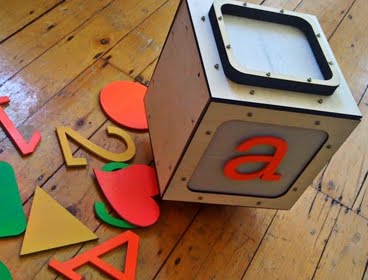
A recent article from MIT News discusses a block-shaped robot that seems to roll onto a computer screen and is part of an educational-media system that gets kids out of their chairs.

"One of the things that make play so important for children's development and learning is that it’s an opportunity to be generative, to be creative, rather than just to receive." - Harvard Senior Lecturer and Director of the Harvard Graduate School of Education's Technology, Innovation, and Education program Joe Blatt (MIT News, 11/22/10)

Thursday, December 2, 2010

ATS Picks 12/02/10

Creative Commons provides free tools that let authors, scientists, artists, and educators easily mark their creativity. Creative Commons can help you find photos, music, text, books, educational material, and more that is free to share or build upon utilizing Creative Commons enabled search services.


The Center for Social Media has created a set of teaching tools for teachers who are interested in teaching their students about fair use. The tools include powerpoints with lecture notes, guidelines for in-class discussions and exercises, assignments and grading rubrics. We hope you'll find them useful!

In AU Professor Larry Engel's Advanced Documentary Technique class, ten grad students used the "Code of Best Practices in Fair Use for Online Video" to try to create "fair use" mashup videos. Take a look at the videos and decide how well (or not) they did!
(An activity from the Center for Social Media)

4)
Edutopia Digital Youth Portrait: Nafiza, 18 years old

Discussion Questions
1. Is Nafiza typical of kids in your community? Why, or why not?
2. Is it surprising that Nafiza spends so much time playing video games? Why, or why not?
3. Nafiza uses technology "from the moment she wakes up." Is she over-connected?
4. What skills is Nafiza learning by participating in Global Kids? How is Global Kids changing her worldview?
5. Why do you think kids like Nafiza enjoy virtual worlds like Second Life? Do virtual worlds have any learning potential?

Spanish Skits Using iMovie and Green Screen

Ideas for Green Screen Video Production

Last year Ms. Jamison introduced the green screen idea to the Middle School. By shooting your next project on a green screen, you have ability to create a clean and stylish video production. Since you will have the ability to alter the background of your production, there are no limits to the creative direction of your final composition. The basic idea of green screen production is simple: setup a green screen, shoot the presentation in front of it, then remove the green in your video editing software (iMovie) and replace it with your chosen background in post production.

Here are some of the
latest images from Hardy's eighth grade Spanish classroom.


A Lesson to Introduce Students to Creative Commons Licensing Agreement

Seventh graders in Billing's classroom were introduced to Creative Commons Licensing Vocabulary when they were asked to conduct research on an Incan topic using Wikipedia. They were asked to use images and consider their licensing agreements. Each wikipedia image file includes: description, date, source, author, file history, file links and permissions- licencing agreement for use and distribution.

An example of one of the licenses is shown below:

This file is licensed under the Creative Commons Licensed Attribution-Share license

You are free:
to share – to copy, distribute and transmit the work
to remix – to adapt the work

Under the following conditions:
attribution – You must attribute the work in the manner specified by the author or licensor (but not in any way that suggests that they endorse you or your use of the work).

share alike – If you alter, transform, or build upon this work, you may distribute the resulting work only under the same or similar license to this one.

You may elect the license of your choice

Wednesday, December 1, 2010

Eighth Grade Current Event History Blog

Read the latest eight graders posts and comments to the Current Event History Blog. All the leading questions are selected by students .

Hs8-4 Blog Post: Airport Security: Too Much or Too Little
  • Do we need this security, or more?
  • Can we do with less security?
  • Where would YOU draw the line between what is necessary/appropriate?
  • Are you worried about flying?
  • Who should make these security decisions?

Hs8-2 Blog Post: Hazing in Needham
  • Based on your understanding of the Mass Hazing Law, is the suspension of the 5 players on the Needham High School soccer team just punishment for the alleged hazing incident that the younger classwomen were subjected to; why or why not?
  • Do you think the parents were right in their efforts to override the decision the judge made to not allow the girls to play in the tournament game?
  • If all students are clearly made aware of hazing laws by their school, then why do kids continue to commit such mean and degrading acts on other students?
  • How would you react if you were with a group of your school friends and you witnessed another group of students who were “hazing” another student or group of other students? Keep in mind the students committing the hazing act could be several years older than you.

  • Is piracy a significant issue?
  • Should people have the right to copy software?
  • Is Microsoft being too extreme in its prevention methods?

Tufts Center for Engineering Education and Outreach Open House

The Center for Engineering Education and Outreach will be hosting its 3rd Annual Open House on December 9th, 2010 from 4pm-7pm.

474 Boston Ave ~ Curtis Hall, lower level

Come and Explore a day in the life of working at CEEO!
  • conduct research studies like their graduate students
  • test their educational technologies like their product developers
  • think of ways to teach engineering like students in their STOMP Outreach Program (STOMP for STEM)
  • and, of course, play with LEGO products!
Win LEGO prizes!
Kids take home a bag of LEGO bricks!
Play a part in the CEEO's largest SAM movie!
Meet the amazing faculty, students, and staff of CEEO!

Register at http://ceeoopenhouse.eventbrite.com
(You do not have to register to attend)

Movie Making Competition

The Chronicles of Narnia: The Voyage of the Dawn Treader
"What's Your Adventure?" Sweepstakes


Enter for a chance to win a screening of Chronicles of Narnia: The Voyage of the Dawn Treader for you and 100 of your friends at a theater near you!

Make an adventure movie using SAM animation, free stop-motion software that allows you to create your own movie in minutes.

Click here to see a sample animation.

iCreate to Educate: SAM animation workshop

Educator's Institute: Going Beyond the Animation

There is still space left in the full-day hands-on workshop at Tufts University this Saturday! This is an opportunity to explore the ways stop-motion can be used as a tool to enhance and assess conceptual understandings by your students in science, math, and other subjects.

WHEN: Dec. 4th, 9am - 4pm
WHERE: Tufts University, Medford, MA

Click here to register

$175 registration fee (or $245 for the fee plus your own webcam classroom kit!)
All fees include a free copy of the SAM Animation software.

**lunch will be served**

If you can't make this one, there will be another conference held in January:
EDCO Collaborative
Waltham, MA
Jan 27th, 2011
4pm-7pm

Friday, November 19, 2010

Information Literacy Quiz - Answers

Somewhat Savvy (0-5 points)
Moderately Savvy (6-10 points)

Downright Nerdy (10+ points)

1. List four major search engines and a major directory.
A: For a full list of search engines, directories, and all their functions check WIKIPEDIA's list of search engines

2. What is a blog?
A: Blog is short for weblog - it is literally a log of the Web

3. Why might you use quotation marks when conducting a search?
A: Use "quotation marks" to ensure your keywords appear in your search results in the order you have specified

4. URL is an acronym for:
A: Uniform Resource Locator

5. Identify three Boolean search terms.
A: AND, OR, NOT

6. How do you find the owner or publisher of a Web site?
A: Go to www.easywhois.com and enter the URL of the site you would like to research

7. Identify these extensions and what they represent:
(A: .org - organization .com - company .sch school .k12 - most US school sites .edu - US higher Ed .gov - US government .ac - higher ed outside US usually used with country code, example, ".ac.uk".net - network .mil - military .co - company)

8. How do you find out who is linked to your school’s Web site?
A: Go to AltaVista www.altavista.com and do a LINK: command search. In the search box type link:your school's address

9. What clues in a Web address might indicate you are on a personal Web site?
A: Look for a tilde “~” or the “%” sign or a personal name “jdoe” or the word “user” after the domain name and the first forward slash “/“

10. How would you conduct a search for the following: a list of Web sites of all the academic institutions in South Africa? (Hint: South Africa’s country code is .za)
A: Go to AltaVista www.altavista.com and type host"ac.za in the search box

11. How do you find the history of any given Web site?
A: Use the Wayback Machine. Type the URL of the web site you would like to research into the search box.

12. How would you conduct a search for the following: US higher education Web sites that contain the word turtle?
A: Go to AltaVista www.altavista.com and type "host:edu + turtle" in the search box

13. How do sites get to the top of a result list in GOOGLE?
A: One factor Google uses to rank sites is popularity. It counts the number of links from sites all around the Web. For example, if a large number of sites has a specific keyword somewhere on their Web site along with a link to a particular site, Google counts the number of times the keyword appears along with the number of links to a particular site. The higher number of links to a site, the higher Google will rank that site on a list of results. There are several additional factors as well, including but not limited to the title of the site, the site’s meta information and the actual content of the site.

From http://novemberlearning.com/

Thursday, November 18, 2010

ATS Picks 11/18/10

1) How the US Engages the World with Social Media
An interesting article about the ways the US government is using blogging, Facebook and Twitter to improve our image in the world.

This free site makes it easy to create your own timelines. They aren't fancy, but they are quick and you can print them out or embed them on another website.
This ReadWriteWeb blog post summarizes some of the recent comments made by Facebook founder, Mark Zuckerberg, regarding Facebooks new privacy settings.

4) Edutopia Digital Youth Portrait: Cameron, 11 years old


Discussion Questions
1. Is Cameron typical of kids in your community? Why, or why not?2. How would you describe the attitude of Cameron's parents toward technology and Cameron's interest in digital media?
3. How would you describe the attitude of Cameron's teachers toward technology and Cameron's interest in digital media?
4. What did you think of Cameron's Rewind video? Was this a good use of multimedia for learning? Why, or why not?

5. What would it take to support kids like Cameron at your school? What are the potential challenges?

Wednesday, November 17, 2010

How much do you know about information literacy?

Take our Information Literacy Quiz. Answers will be posted by Friday!
Somewhat Savvy (0-5 points)
Moderately Savvy (6-10 points)

Downright Nerdy (10+ points)

1. List four major search engines and a major directory.
2. What is a blog?
3. Why might you use quotation marks when conducting a search?
4. URL is an acronym for:
5. Identify three Boolean search terms.
6. How do you find the owner or publisher of a Web site?
7. Identify these extensions and what they represent: (.org .com .sch .k12 .edu .gov .ac .net .mil .co)
8. How do you find out who is linked to your school’s Web site?
9. What clues in a Web address might indicate you are on a personal Web site?
10. How would you conduct a search for the following: a list of Web sites of all the academic institutions in South Africa? (Hint: South Africa’s country code is .za)
11. How do you find the history of any given Web site?
12. How would you conduct a search for the following: US higher education Web sites that contain the word turtle?
13. How do sites get to the top of a result list in GOOGLE?

Tuesday, November 16, 2010

National Ed-Tech Goals

The latest release of the US national ed-tech plan includes the following goals, as summarized in an 11/9 article of eSchool News:
  • Using educational technology to fundamentally change the learning process by making it more engaging and tailored to individual student needs and interests;
  • Using ed tech to develop a new generation of assessments;
  • Connecting teachers with their peers and experts so they are always up-to-date on the resources available to them;
  • Building infrastructure that lets schools support access to technology in and out of the classroom; and
  • Harnessing the power of educational technology to increase school district productivity and student achievement.
What do you think of these goals? Do they align well with BB&N's? Are there any others you would add? You can access the full plan on the Department of Education website.

Monday, November 15, 2010

ISTE Webinar: Cool Tools for School

Sometimes it seems like there are so many Web 2.0 tools available that it's hard to know which ones we should be taking advantage of in the classroom. Fear not! Adam Bellow, the president and founder of EduTecher, will lead this upcoming webinar (Wednesday, 11/17 at 9am) about a number of great Web 2.0 tools, including digital storytelling, digital video, and alternative search tools, to help you and your students create and collaborate. By the end of the hour, you'll have a number of new tools in your toolbox to make learning more engaging and enjoyable for your students.

Please let a member of the technology department know if you are interested in "attending" the webinar.

Best of TED

TED (Technology, Entertainment & Design) is a conference held at various times and places around the world that hosts some of the most fascinating talks from some of the most amazing individuals from across the world. Tickets to TED are highly prized, but luckily for the world, the organizers put all of the presentations up on their website (www.ted.com) for the whole world to see.

There are literally thousands of talks on the website, so I've decided to share some of my own personal favorites with this forum. For my opening post, I've gone with one of my all-time favorites by Hans Rosling, a professor in global health. I love this for several reasons: He asks us to re-assess our understanding and use of the word "Third-world" when we think about countries around the world, he does an incredible job of demonstrating what good data analysis can do, he walks us through a wonderful online tool at www.gapminder.org, and he makes it all so much fun.

I hope you enjoy!


Wednesday, November 10, 2010

MIT Museum: Friday After Thanksgiving


What is the Friday After Thanksgiving? A grand event that could only happen at MIT! Participants link their mini chain reactions together forming one mega chain reaction - set off at the end as the event's thrilling culmination. It's like watching a giant domino demonstration. 1,500 people from all over watch and participate in this fun-for-all-ages "extreme" event.

Also, every Sunday, from 10 a.m.-noon, admission to the MIT Museum is free.

Thursday, November 4, 2010

ATS Picks 11/04/10

The theme of this week's ATS picks is History/Social Studies

1) Online History Games
Playing History is a forum and rating website for over 126 online history-related games for teachers and students alike. The games are compiled and organized by topic, difficulty, general ratings, and much more. The search tool is also very helpful and easy to use when trying to find a specific game. Playing History is also user-friendly, allowing students and teachers to post reviews, scores, and comment on feedback of the website itself. Although not all of the games have consistently high ratings, Playing History is a great place to find educational games online for students to learn more about a particular subject.

2) National Archives Experience: Digital Vaults
The NARA Digital Vaults is an interactive exploration of history that examines thousands of documents, photographs, and pieces of history that have been integrated in a digital format. Upon entering the homepage, the user is given eight random archives to choose from. Clicking on one will give a description and a brief history of that archive, as well as displays a large variety of similar archives. The user has the ability to shuffle, rearrange, collect, and explore archives, as well as search for specific points in history using a keyword search. Although a lack of initial organization or index might seem overwhelming, Digital Vaults is a wonderfully imaginative resource for exploring history in a digitally compiled way.
Sponsored by the National Archives and Records Administration

3) Life Magazine's Civil Rights: Women in the Struggle
Life.com presents a photo gallery of famous women in the struggle for civil rights. Each photo provides a concise description of the importance of each woman, along with links providing more information. Although the collection is not very extensive, each of the fifteen photos provides a unique insight into an important part of a movement that largely goes underrepresented. As far as a general resource, this website is a good start to further student research and understanding, albeit not very comprehensive.

4) EdtechTeacher's Best of History: Games and Animations
The Games and Animations section of EdTechTeacher's Best of History sites is a list of fun history games and animations organized around broad historical periods. Most of these games and animation are aimed at students ages 10-16.

Free online conference: Global Education

The Global Education Collaborative is hosting a huge free online conference November 15 - 19. All sessions take place using the Elluminate software platform (an online meeting space). Please visit the conference website to see a list of sessions. The drop-down menu for sessions lets you filter them by tracks (e.g. see the teacher track.) If you've never participated in an online meeting, this is a great chance to try it out. Please feel free to ask the tech department for assistance if you have any questions about how to register or how to test the software in advance.

Wednesday, November 3, 2010

Free ISTE Webinar: Student Point of View

The Student Point of View on Online Learning: Are We Listening?
Students have ideas and opinions about online learning, but they don't often have the opportunity to share these ideas when schools are exploring or implementing online learning programs. In this webinar, you will hear what students want and expect from online learning. Julie Evans, CEO of Project Tomorrow, shares national Speak Up data from K-12 students and leads a panel discussion with three students currently learning online. Join the discussion, along with George Warren, vice president of K12 Inc., to learn how to bring student voices on online learning to your school's planning process.
Tuesday, November 9 4-5pm

Click here to register

Webinar sponsored by ISTE- International Society for Technology in Education

6th Grade "If You Really Knew Me" Scratch project


Sixth grade students at BB&N just completed their first Scratch project of the year. This collaborative Language Arts and Technology project supported the students’ reading of “The View from Saturday,” which involved a mini Challenge Day where students shared a piece of themselves with their classmates. Check out the online gallery of the students' final projects, and let them speak for themselves!

-Jaime Goldstein and Megan Haddadi

Google Tools for Educators

Google Tools for Educators: The Best Features for Busy Teachers
According to Edutopia, “Among all the links and downloads out there, it can be hard for teachers to know which ones work best. Google has made it easier by creating Google for Educators, which compiles some of the search engine's most useful features in one place. Whether you're teaching Spanish or social studies, mathematics or music, there's a free Google feature that will make your lessons more dynamic and your projects more organized. The lively, informative Web site offers step-by-step visual tours and even videos to help you get set up.” This Edutopia article walks teachers through the best Google tools out there, including: Google maps, Google docs, Glogger, and Google Book search.

Google for Educators

Learn more about Google for educators

Teacher’s Guide to Google Tools for the Classroom

Google suggested classroom activities that use Google Aps

Thursday, October 28, 2010

ATS Picks 10/28/10

1. 100+ Google Tricks that will Save you Time in School
Check out these great tips and learn how to use Google to convert units, do a timeline search, search for a specific file type, search for a face, use Google News, study the oceans, and much more.

2. Protecting Reputations Online
This 3 minute video illustrates what happens to information that you share on the web. Common Craft's unique style makes it easy to understand some of the risks of oversharing information Online.
A small contribution in the fight against rampant immappancy by Kai Krause.
 This map makes it very clear how big Africa really is. Be sure to zoom in to get the full picture.

4. Lincoln Middle Schools Students Use Technology to Help Each Other Succeed
Campus Innovation: Kids Teaching Kids
Lincoln Middle School creates an innovative learning environment centered on kids teaching kids. Middle school students create math video lessons and collaborate via a Moodle-powered class website, creating a community of learners. Eric Marcos teaches 6th Grade Mathematics at Lincoln Middle School in Santa Monica, California. He also operates Mathtrain.TV, a site that features math video lessons (a.k.a. mathcasts) created by his students.


Wednesday, October 27, 2010

Eighth Grade Current Event History Blog


Facebook is failing to prevent child predators from posting suggestive and potentially illegal photographs of children on its website, a weeks-long investigation by FoxNews.com reveals, despite its claim that it's doing all it can to keep pedophile materials from being displayed.

This topic, which is the first paragraph from a Fox News story, was chosen by Bill Rogers eighth graders for their first blog discussion this year. Blogging was piloted early last year by Miles Billings and quickly accepted for use in our eighth grade history curriculum. To view this blog post and read the student comments (100-200 words), and the leading questions, click on Facebook Abuse: Peter's Post. Posts and comments will be assigned about twice a month, selected from student submissions. Bill Rogers/MS History