

Showing posts with label 8th grade. Show all posts
Showing posts with label 8th grade. Show all posts
Friday, June 8, 2018
Ceramic Artist Students Wikis


Tuesday, January 2, 2018
Grammar Website in the English Classroom
Grammar Website created entirely by the MS English Teachers (through the launch grant program) is a new and innovative approach to teaching and learning grammar. The site is a comprehensive writing resource for BB&N Middle School students. Students use the website to watch Parts of Speech grammar videos, review the definitions of the Parts of Speech and play Parts of Speech review games.


Art, Tech, & Math: Vinyl Cut Decals and 2D Tessellation Geometry Patterns on Pottery
Eighth grade students in Sasha’s Bergmann Wheel Pottery and Surface Design Class are learning tessellation patterning through a hands-on artistic application using the Silhouette Cameo printer and exploring a cutting-edge ceramics technology for glaze decoration. Each student designed a shape and printed the pattern repeatedly to create tessellation patterns on their decorative pottery.

Wednesday, November 8, 2017
Technology in English Classroom
"Two technology initiatives, facilitated by and co-developed with Svetlana Grinshpan, are now mainstays in the English curriculum. The first initiative is the To Kill a Mockingbird blog, which enables students to share their analysis of complex ideas in the novel. During the course of their reading, each student posts and comments several times. The blog not only enriches students’ dialogue about the novel, but it also creates a lasting resource as they need to pull those ideas together and organize them into a final essay. They are much better prepared for this final essay in terms of organization, crafting thesis statements and providing quotation for support as well.


The second initiative, The Outsiders Yearbook, has been adopted by most of the English department. Students “research” an assigned character thoroughly and create a yearbook page that demonstrates understanding of the complexity and nuance of that character. In addition to writing a short essay in that character’s “voice,” students dress as that character and use green screen technology to create yearbook-style photographs of that character. They compile their writing and photographs and create a layout of their work on a “yearbook page.” Students have great fun with the project, and it elevates their understanding of subtleties of characterization and motivation in the novel. "
Betsy Canaday, MS English Department Head
Wednesday, April 26, 2017
Science Night 2017
This year's 8th grade Science Knight was billed as an evening of Chemistry Connection. Students prepared demonstrations, created poster boards and prototypes of their inventions. Their invention can be a brand new technology or a new application of an existing technology and address one of the seventeen Sustainable Development Goals (SDG) as set out by the United Nations in 2015. Here is the link to the Chemistry of the Future Videos
Students created a prototype of their inventions using many materials and supplies in the maker space (cardboard tubes, cereal boxes, glitter, electronics …) These are some of the questions students have tackled: Why is spider silk so strong? Why does chocolate taste so good to humans but is toxic to dogs? How can hair be used to solve crimes? Can beet juice be used to melt ice on your driveway?

Tuesday, March 14, 2017
Kahoot! and other games in the curriculum
Playing a Kahoot! game is a very popular MS classroom activity. Students and teachers create games in world languages, music and science. Kahoot! is a web-based tool that allows asking a consecutive, quiz-show type questions using a game-based format. Students respond by joining a game through a unique number using any mobile device.
A list of other teacher's favorite classroom games:
A list of other teacher's favorite classroom games:
- Quizlet Live - create a collaborative classroom game
- Socrative is a student response system that works across all devices. Teachers can ask a number of different question types and gather student data for formative assessment.
- TinyTap - create fun games, personalized puzzles, question and answer activities, turn reading a book into an interactive activity, make a tappable sound boards.
- Quia - an online platform to create quizzes, games, and assignments online. There are wide range of games: flashcards, matching, challenge board, hangman, rags to riches, pop-ups and more. Examples of student created 7th grade games in history:
Explore the use of Sketchup in Latin
In the 8th grade Latin classroom, Tony Breen uses Sketchup to expose his students to multiple aspects of architectural construction and lets them get a glimpse into the various phases of the building process.
Sketchup Assignment:
Construct a monument (temple/victory column/arch etc.) to commemorate one of the following:
- Religion
- Janus Mars V esta
- Historical Personae
- Cincinnatus
- Constantine the Great Hadrian
- Horatius
- M. Agrippa
- P. Cornelius Scipio Africanus Romulus
Incorporate a decorative element or elements which indicate some aspect(s) of the god/goddess or which refere to an episode of the character’s achievements. Somewhere on the monument indicate a likely date for its dedication (e.g. a cornerstone).
Prepare a short report (5 or 6 sentences) describing the story of the monument: to whom is it dedicated? What are its dimensions? What specific motifs does it include (types of column etc.)? Any symbolism in the monument?
Prepare a short report (5 or 6 sentences) describing the story of the monument: to whom is it dedicated? What are its dimensions? What specific motifs does it include (types of column etc.)? Any symbolism in the monument?
Monday, March 13, 2017
Videoconferencing with the school in Morocco
An 8th grade Arabic class partners with a school in Morocco. Through several video-conferencing sessions (using Skype) the students learn about each other’s cultures. Later in the semester the class will write a play in Arabic, while the school in Morocco writes a play in English. Students will exchange plays and perform them for each other via video-conference.


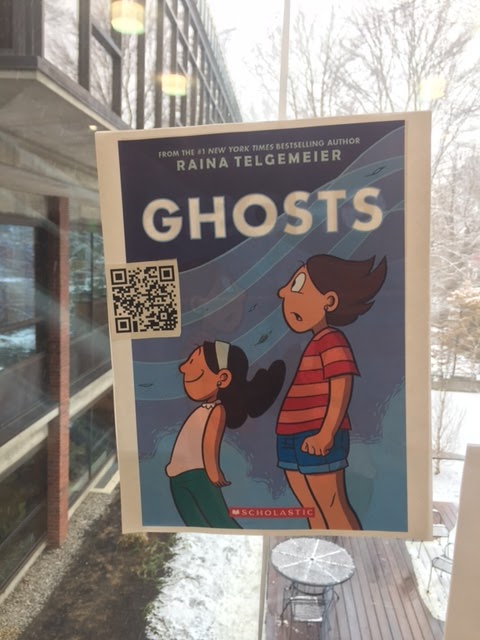
QR Codes Book Display in Middle School LLC
Want to find good books to read over break? The Library Learning Commons (LLC) faculty has created QR code book displays in the first floor foyer window display. QR codes consist of black squares arranged in a square grid on a white background, which can be read by the QR reader app on a smart phone or iPad. A QR code is really just a website URL, but it allows phones, iPads, and other mobile devices to easily pull up the website by scanning it with the camera, rather than needing to type in a long URL. This makes it easier to bring a visitor to a website to get more info.
To read the QR codes:


To read the QR codes:
- Download QR Reader for the Phone app to your Phone
- Scan the QR code with your phone to read a review from Goodreads



Coding with Scratch in 8th Grade Math
Inspired by an array of digital screens projecting an interactive pattern simulation during our field trip to the Museum of Science this fall, MS math teacher Randi Currier, challenged 8th grade students to use the Scratch coding environment to create their own interactive art exhibits. Their task was to incorporate geometric concepts, such as angle measurements in relation to number of sides. Students applied coding skills of program structure, variable declaration, iteration and conditionals to create their exhibits. They brainstormed ideas of what makes an interactive exhibit engaging:
- Interesting visual effects
- Variables with sliders
- Color
- Sound
- Random elements
- Immediate feedback
Below are the top five exhibits, voted by the students:
Tuesday, November 22, 2016
3Doodle in the 8th Grade Art and Tech Class
In the 8th Grade Stephanie Moon's Art and Tech Class students are exploring 3D Printing Pen and are giving an Art Challenge to design a 3-dimensional "drawing" that communicates a personal and social message to the viewer through the use one of the following concepts:
- merging multiple images to create symbolic meaning
- words as visual forms to communicate meaning
- a close examination to make us more aware of something
Use of Padlet at the Middle School
Padlet is a virtual wall, it works like an online sheet of paper where students and teachers can put any content (e.g. images, videos, documents, text) anywhere on the page and from any device. Key features include customizing the wall and the background; choosing how the posts appear on the wall; setting up privacy settings
At the MS teachers use Padlet in Advisory as a way of getting feedback about various units. For example, here is the teacher feedback on 7th Grade Orientation 2016-2017
More Ideas for using Padlet in the Classroom:
Students in Sasha's Bergmann Dinnerware and Wheel classes uploaded their photos and inspiring quotes to the class Padlets Dinnerware Hump Mold Set Project and Wheel: Cylinder Project
- Use it as a portfolio to share with parents. Snap pictures of student work and share them.
- Have students sort pictures on Padlet to classify them
- Use it as a class back channel and have discussions on it.
- Have students work a problem, and snap a picture of how they worked it.
Monday, November 7, 2016
Thursday, November 3, 2016
What is Gerrymandering and who was Gerry?
Building off of a National Council of Teachers of Mathematics lesson, students in Randi Currier's 8th Grade Math class discovered a major factor behind the House of Representatives’ incongruous outcome: Gerrymandering.
 They masterfully led a discussion about the brilliant Republican strategy, operation RedMap, following the 2010 census. Using the architectural software SketchandCalc, students calculated ratios to objectively evaluate the likelihood that a district had been gerrymandered. They learned the layout of their own Congressional district, how districts are often manipulated, the effect of technology on re-districting, and various relevant analytical ratios.
Randi Currier's most valuable take aways from the lesson: "Exemplars for us all, they thrived on data-driven, respectful, productive discussions around a hot political topic".
If you see one of them, ask them who Gerry was!
Wednesday, October 8, 2014
New MS POP Initiative~ Positive Online Presence
Collaboration with Sandra Cortesi, Director of the Youth & Media Center from Harvard's Berkman Center, and our soon-to-be MS Leadership Council
Sandra and her Team represent a fabulous local resource! The new MS POP Initiative is an exciting follow up from her visit with the Middle School Tech Team last year and this collaboration opportunity provides a remarkable "focus" for this year's Leadership Council.
Why we are so excited?
- Opportunity to collaborate with the Berkman Center and participate in their innovative work and contribute to the center’s ongoing research
- Means to stay up-to-date on current ways that young people interact with digital media such as the Internet, cell phones, and video games, harness associated opportunities and address media challenges
- Opportunity for the Middle School students to develop as leaders
- Shape MS technology policies (rules/norms)
- Design and develop two units for the 7th and two units for the 8th grades and facilitate the instruction.
- Student-driven teaching is the most effective. Students teach each other what is most important to them (with adult framing of the conversation). A sample of student-driven topics of interest we envision:
- Privacy, reputation, and social media;
- Safety; Online relationships;
- Creativity and strategies to make student’s work more visible;
- How to use the Internet as a tool for empowerment - how the Internet can teach students anything they want to know more about;

For some quick background on the Berkman Center:
Friday, May 9, 2014
8th Grade Science Journal
The BB&N 8th grade class of 2014 designed and conducted field studies at Drumlin Farm in Lincoln, MA. The Knight Science Web Journal is a compilation of all of those reports. Here is a link to see it: http://tinyurl.com/KnightScience2014
Thursday, May 24, 2012
KNBC revamped MS Clubs and Organization webpage
KNBC, Knights Broadcasting Club, a student media club, meets weekly during the school day. Projects from the 2010-2011 school year included Cambridge's contribution to the collaborative documentary project, Mapping Main Street (http://www.mappingmainstreet.org/) and an exploration of new media including Meez, Flipbook, iMovie, ComicLife, GarageBand, iPhoto; in the second half of the year, students put their skills into practice as they developed and ran several seminars on BBN Arts Day in March and produced a variety of short films for the final assembly in June.
In addition to building on these initiatives, members of KNBC 2011-2012 worked on a few longer term projects including photoshop and original short animated films. KNBC meets during study hall on Tuesdays, with the occasional off-campus field trip to locations such as the WGBH studios, Museum of Science and the Institute of Contemporary Art (ICA).
KNBC's latest project was revamping the Middle School Cubs and Organization page. Students worked in groups using a variety of media to create content for KNBC, Chorus, Science, Community Service, The Spark, Jazz Band, Affinity Lunch, Chamber, D-Squared, Literary Group and BB&N Players. In addition they created this fun video to capture their work.
Enjoy!
In addition to building on these initiatives, members of KNBC 2011-2012 worked on a few longer term projects including photoshop and original short animated films. KNBC meets during study hall on Tuesdays, with the occasional off-campus field trip to locations such as the WGBH studios, Museum of Science and the Institute of Contemporary Art (ICA).
KNBC's latest project was revamping the Middle School Cubs and Organization page. Students worked in groups using a variety of media to create content for KNBC, Chorus, Science, Community Service, The Spark, Jazz Band, Affinity Lunch, Chamber, D-Squared, Literary Group and BB&N Players. In addition they created this fun video to capture their work.
Enjoy!
Sunday, May 1, 2011
To Kill a Mockingbird Blog

For the past several years, and thanks to the inspiration of Eric Hudson’s idea, my class creates a blog as we read To Kill a Mockingbird. The book is great fun study with eighth graders both because of their eagerness to practice their new skills in literary analysis as well as their passionate responses to the events in the book. The blog provides a perfect venue for them to share insights into the novel and to create a communal, public record of the evolution of their ideas. They post about symbols they identify in the novel. They post about their moral outrage as they read about the verdict. They comment on each other’s posts in order to agree, disagree, or refine their classmates’ ideas.
Students are required to write polished paragraphs and to support their ideas with evidence from the text. Because they know how public and lasting their writing is, and that its purpose is to build a communal resource, they are invested in contributing their best work. Each student writes frequently and receives immediate feedback from their classmates as well as me. This blog has become an exciting and invaluable component of teaching this novel. By the last chapter, the students have worked together to create something for themselves and each other of genuine intellectual achievement.
Besty Canaday, MS English Department Head
Monday, April 11, 2011
Poetry Project in the English Classroom
For the last two weeks, eight graders were working on composing a series of creative interpretations of the selected poet’s work. Today in class they were presenting and explaining their multimedia piece to the entire class. There were 4 required components to the project:
- Create a Visual Interpretation of a poem into a comic strip
- Create a Multimedia interpretation of a single poem: compose the film so that the images enrich the tone, sound and meaning of the poem
- Write a Biographical Poem that pays tribute to the poet by imagining, in detail, a key event from the poet’s life, using real facts and details garnered from the research.
- Write an Explication describing the process and the choices that helped make the comic/video/poem.
The videos are made private on our 8th grade youtube Poetry Channel. You must be signed in to view the videos. Please ask Svetlana, Paige, Betsy, Ethan or an 8th grader for a password.
Here are a few examples of student's creative intepretations:
Sunday, February 13, 2011
Green Globs in the 8th Grade Math Classroom

Green Globs is a game in which 13 green globs are randomly placed on the grid. Students earn points by entering equations that pass through as many green globs as possible. After learning about coordinate graphs and equations in math class, students in eight grade came to the middle school tech lab to put their knowledge to work by playing the "Green Globs". Here's how the game was played: If student's correctly entered an equation, they hit a green glob target. After becoming more proficient at the game, the eighth graders can advance to the higher level - challenged by "blockers" that force them to find alternative equations to hit the targets.
Subscribe to:
Posts (Atom)