links to tags

Filter by: LS     MS     US     Tech in the Classroom     Launch Projects


Thursday, February 10, 2011

MEMSET meeting yesterday

Yesterday Colm Eliot, Svetlana Grinshpan, Julia Kelly and I attended the 2nd meeting of the Massachusetts Elementary and Middle School Educational Technologists (MEMSET). This is a new group formed just this year, meeting first at the Brookwood School last October and then at the Tenacre school last night.

The evening included several presentations, dinner and discussion. The group has decided to meet monthly, so if you are interested in attending a meeting, please let your ATS know. The meetings will focus on technology integration in the elementary and middle school grades.

Technologies/Topics of discussion last night included: movie making in world languages classrooms using flipcams, comic life, keynote, stop motion animation software, virtual field trips on iPods, wikispaces, and Google Aps.

Schools in attendance included (but were not limited to): BB&N, Park, Shady Hill, Fessenden, Chestnut Hill, Belmont Day, Fay, Derby Academy, Brookwood, Meadowbrook, Pike, Shore Country Day, Brimmer and May, Kingsley, Ten Acre. Advent, Nashoba Brooks, and Bell South.

-Megan Haddadi

High School History - Feb 16

Here is a professional development opportunity to participate in an online webinar...
Feb-16 4:30PM EST -- The Digital History Teacher & Paperless Classroom
Host Tom Daccord welcomes featured guests Michael Hutchison and Beth
Yoder, social studies teachers at Lincoln High School in Vincennes,
Indiana, who elected to “go digital” and move their classes to a
paperless curriculum. Michael is a 33-year veteran teacher named
"Teacher of the Year" by the Indiana Computer Educators in 2002 and
"Technology-Using Teacher of the Year" by the International Society
for Technology in Education.
Register at: http://tiny.cc/NCSSwebinar

Future EdTechTeacher webinars include Teaching Science with Technology
and 21st Century School Leadership. Details T.B.A.
Tom

--
Tom Daccord
Co-Director, EdTechTeacher
Chestnut Hill, MA
tom@edtechteacher.org
http://edtechteacher.org/
http://besthistorysites.net/
twitter: thomasdaccord

Professional Development in Technology: The BB&N Launch Project

Here is a description of how the launch grant process works. Click the play button below...

Created with Xtranormal- a fun website that lets you make animations like this one by choosing: a set, actors, sound and music and typing what you'd like your actors to say.


Created with Scratch - a programming language for everyone.


Wednesday, February 9, 2011

iBOOKS, PODCASTS, MINDMAPS Exploration


In my work as Learning Specialist at the Middle School, I encounter students who often struggle with the reading volume and rigor the curriculum asks of them. They may lack the ability to read for main ideas, get mired in details of the text and miss important themes being emphasized in their classroom instruction. Lack of reading fluency may continuously bog them down. I was intrigued by the possibilities of exploring digitized text on the iPad and how using this technology with my students might make the reading assigned more accessible to them given the interactive design. I wanted to model active reading strategies with this technology in the hopes that students would be more apt to apply these approaches independently. I was also interested in learning about applications that would enable me to vary instruction of certain skills (i.e. mind mapping, organization of ideas prior to writing) based on the student’s learning needs.

iBOOKS

I was able to find several of the MS texts in iBooks (some were free.) The ability to highlight and create notes (or post-its) allowed me to model to students in a very concrete way the skill of reading for main ideas – something that is just not automatic for some. The Dictionary function within iBooks only adds to increasing comprehension and the Search function is an instant link to Google or Wikipedia to gain background information on any event, concept the student encounters in the reading. Lack of background information can be costly for a student, creating an impediment to fluid reading and comprehension of the text. Shakespeare Pro is an excellent app, containing over 30 plays, quotes from various works and a glossary function that defines several more words within a passage than the text students read.

PODCASTS
Various podcasts are also available to download (and email link to student) of texts Middle Schoolers are reading. A valuable asset, podcasts can take the place of audio books and truly make a difference in reading comprehension for many of our students who learn and process more effectively when information is presented orally. Librivox in iTunes and iTunes U offered some of the texts students read during the 7th and 8th grade English classes.

MINDMAPS

Both Whiteboard and iThoughts HD are solid mindmapping apps that have the added bonus of exportability. Either can be easily exported to students’ email (Whiteboard via Photos) so that whatever map or visual a student and I create is waiting for them in their First Class email to either view or print at home and work from. I am eager to keep applying these findings to my direct service work and continue to explore this technology. The interactive nature of the iPad forces one to be active with information, which ultimately seems to engage the student more.


Jamie Wallace, Learning Specialist at the Middle School

Enhancing the MS Library Website: the Portal to the Library and its Information.


As middle school librarian, I am constantly challenged to find new and innovative ways of providing user-friendly, easily accessible quality information for our students. With this in mind, my launch grant is designed to enhance the ms library website, the portal to the library and its information. I used a three-pronged approach:


1. I re-created the MS website using Google Applications, because it’s more readily accessible, easier to navigate and it lacks the many layers of password protection required by the previous website created with First Class’s Rapid Web Design. Check it out at https://sites.google.com/a/bbns.org/middle-school-library/

2. I explored the various subscription databases, e-books and websites linked on the website. I experimented with a variety of search engines and directories. I conducted searches typical for MS science and history classes, the two primary subjects for which our MS students conduct research. I determined that some databases are more useful to our curriculum than others. Facts on File history databases were quite helpful, but the Science Online database was not as useful for science fair research as simply using search engines such as Advanced Google and Sweet Search. Our task now is to integrate effective search strategies and website evaluation skills within MS curriculum. I look forward to working with the BB&N community as we move forward in this effort.

3. I am seeking student input to develop new aspects of the website, including blogs and book trailers, for the upcoming Read-a-thon and Community Read, visuals, voice thread, and potentially, in the near future, entertaining online skills instruction on the website. I’m trying to make the site more interactive and engaging.


Beth Brooks, MS Library Director, All School Library Coordinator

Tuesday, February 8, 2011

iPad Research and Exploration


In my research and exploration of the iPad, I have found that it is superhandy for media viewing, internet browsing, doing research and keeping my calendar organized. However, in my attempts to use it as I use the tablet PC for teaching, I found it was severely limited in three very important ways: 1. Projectability 2. Note-taking 3. Syncing. Currently, I use my Tablet PC for all of my classroom work: grading, lesson planning, scaffolding, modeling, etc. The Tablet allows me to write over text or documents, so I can project the text of a book we are reading, add to a lesson agenda, model proper mechanics, edit an essay. This is where the iPad falls short as a teaching tool because only a limited numbers of apps can a. be projected and b. allow me to write with a stylus on a document (none of the e-book readers that I have explored allow this).

Additionally, I have yet to find the best way to sync and access all of documents and OneNote files (my planner) on the iPad. That said, if we were to have a class set, I could see the iPad being a great tool in English for graphic organizer, reading, organizer, researching, brainstorming and collaborating. Additionally, students could use the iPad as an electronic notebook, binder, research tool and textbook. I think it would be really cool to pilot a program in which a group of students uses iPads for the entire year in place of traditional educational gear (pen, pencil, paper, notebook, binder, books, computer) to see how effective it could be.

Useful Sites & Resources


Rachel Jamison, MS English Teacher

Wednesday, January 26, 2011

Alternative Energy Kits in the Science Classroom


The fourth grade has been exploring alternative energy sources as part of their Chemistry/Environment unit in science. Through a LAUNCH grant, I purchased 5 kits to pilot with this year's class so I could determine which educational kit would be the easiest for students to understand and be successful with. The kits we are working on include: Thames and Kosmos' Wind Power, Hydro Power and Fuel Cell Car Kits, along with Horizon Technology's Renewable Energy Kit, and Elenco's Snap Circuits' Green Kit. The students took on the challenge, and despite difficult directions (mostly geared toward adult readers), the fourth graders have problem solved, and teams have successfully constructed a working mill and a fuel cell car. Students are beginning to understand that there are sources of energy other than fossil fuels that we could be tapping and exploring in efforts to be more environmentally friendly! Our goal is to finish exploring the kits by the end of this month and have teams present their challenges and successes along with their recommendations so we can purchase the kits that support the best learning of the concepts presented in this unit.

-Maria Elena Derrien
LS Science

eReaders in Education

Reader
Once you’ve negotiated the Gordian knots of getting accounts through the school, iPad, Nook and Kindle perform exactly what their advertising promises, so...


eReader

Which is my favorite? iPad; no contest. I can build and organize an extensive library (much of which is free), bookmark several books at several points, enlarge print (or change style of font), even have the ‘read aloud’ function on (though with fiction this is more annoying than I can stand). In short, I’m carting around a virtual wheel-barrow full of books that doesn’t spill or get out of order.

Danger danger: This is soooo addictive.

The Big Picture: Illustrations are happening. The Earnest Shepherd ones for Pooh, for instance, have colors very close to the original. I expect more and more picture books by the day.

Dictionaries, highlighting and note taking functions make this seem like a great teaching tool.

Oh, and email and all my favorite sites are right there too, including Netflix and any games I might want plus the iPad functions as an iPod and can be my photo album etc.

Nook and Kindle do the electronic reader thing adequately. All 3 make great one on one learning tools. Ask me for my list.

Problems: Kindle has hampered itself in that it cannot accept materials from anywhere but Amazon. Nook likes Barnes & Noble. The advantage: no distractions like sample games or surfing.

Conclusion: It’s a rapidly evolving technology… so new models arrive in the Spring.

Next moves: Using these with students, and researching group rates.

Recommendation: School could make setting up an account simpler.

-Heather Lee
Lower School Librarian

Tuesday, January 25, 2011

The Search for Useful Technology in the Early Childhood Classroom


As early childhood educators we are constantly trying to solve the riddle of how we as teachers can invite technology into our child-centered classrooms. We want technology that expands on the children’s ideas about the world, not have their ideas confined by teacher direction. Children at this age explore the world around them through communication and manipulation. They learn through controlling movement and interactions between objects in their environment.

This year the BSR classroom was thankful for the permission to purchase a Smart Table through BB&N’s LAUNCH Grant Program. The Smart Table is a multi-touch, collaborative technology instrument for students at the primary and elementary grade levels. Teachers can customize activities so groups of students can create, explore, and problem solve together by manipulating icons on the table with hand gestures. We feel that the Smart Table shows great potential as an integrated technology piece in the early childhood classroom. It allows groups of students to observe videos, view themselves in classroom photos and short clips, and to use one of the many ready-to-go lesson activities found online in the Smart Exchange. Stay tuned for further updates on the Smart Table in our classroom.

Shera and Anthony
Beginners Teachers

Wednesday, January 19, 2011

Update on LEGO WeDo at the Lower School


4th grade students just completed their second LEGO WeDo creation and are beginning their third model. Students built and programmed a mechanical lion that makes sounds and is motorized to lift and lower its front legs as if it is sitting up and lying down. They “trained” their lions to sit up and roar, then lie down and snore when they threw it a “bone” made with a tilt sensor. Now the students are in the process of building a mechanical bird that makes sounds which are activated by manually tilting the bird up and down to lift and lower its head and flap its wings.
(The looks of surprise captured on the children's faces in the photograph above are due to the lion's head popping off as the students were trying to figure out the correct motor power and number of rotations required to make the lion sit up properly.)

-Megan Haddadi


4th Graders Create Solar Powered Vehicles


Prior to introducing my students to the Renewable Energy Kits purchased through my LAUNCH grant, I decided the fourth graders needed a background on how renewable energy works. I had them design and build solar powered vehicles out of Radio Shack solar cells and motors, as well as spare parts from LEGO MindStorms kits. A few days ago we had some sun, and we and tested our vehicles outside. We realized we need a more intense sun to create enough current to power the motor and will wait until the spring to try again! As we move forward, fourth graders will be working with other alternative energy sources (hydro power, wind power and fuel cell technology) while exploring the educational kits purchased through the LAUNCH grant. Check back shortly for an update on how the kits are going!

-Maria Elena Derrien

Sunday, January 16, 2011

New "FAM" portal for parents

In early January the school launched a new website portal for parents to view report cards and the school directory of family information. This portal, named "FAM" for Family Access Module, is part of our student database system. Middle and Upper School report cards are already within this system and we hope to add Lower School reports to it next year. The online directory includes family address data. A benefit of this system is that parents can submit any changes (phone numbers, email addresses, etc.) right on the site. The link to the FAM portal is on the parents page of the BBN website under "Quick Links." There is also a PDF help file that describes the portal located online here.

Teachers have access to the student database through their "TAM" accounts, and can access the parent directory information there.

Monday, January 10, 2011

Schools in the Digital Age

These videos feature reflections on education and the use of digital tools. After viewing the videos, please use the comments box on the bottom of this page to post your thoughts and reactions in the context of teaching and learning at BB&N.

Ken Robinson's "Do Schools Kill Creativity" is a must see video.


Alan November has been reflecting on educational technology for decades.


Larry Rosenstock's "High Tech High" describes a school based on the principles of project based learning.


Salman Khan's "Khan Academy" is a free online set of videos that teach elements of mathematics and other subjects bit by bit.


Michael Wesch's "The Machine is Using Us" shows how the nature of text and publishing has changed forever.


Teaching in the Digital Age

The videos below feature teachers reflecting on their craft. After viewing the videos, please use the comments box on the bottom of this page to post your thoughts and reactions in the context of teaching and learning at BB&N.

History teacher Diana Laufenberg shares 3 surprising things she has learned about teaching...


Math teacher Dan Meyer reflects on how a digital projector changed his teaching...

dy/av : 002 : the next-gen lecturer from Dan Meyer on Vimeo


Instructional technologist Sam Morris takes a light-hearted look at teaching paperless in this "I Hate Paper" video...


Please post your thoughts, reactions, and comments to these videos.

Born Digital

Born Digital by John Palfrey and Urs Gasser explores the implications of the digital environment in which our students grow up. Each of the videos below represents a chapter of the book. These videos were created by Berkman Center summer interns.

After viewing the videos, please use the comments box on the bottom of this page to post your thoughts on these videos in the context of BB&N.


Chapter 1: Identities


Chapter 2: Dossiers


Chapter 3: Privacy


Chapter 4: Safety


Chapter 5: Creators


Chapter 7: Quality


Chapter 8: Overload


Chapter 9: Aggressors


Chapter 10: Innovators


Chapter 11: Learners


Chapter 12: Activists


Please post your thoughts, reactions, and comments to these videos.

Saturday, January 8, 2011

Online School for Girls offers "Blended Learning" course for any teachers

The Online School for Girls is an effort by independent girls schools to move into the digital delivery of courses. In addition to offering courses to high school students this organization also offers 6 week online seminars to teachers [for any middle or upper school teachers]. The seminars teach you how to use a "blended learning" approach to enable you to add an online component to your face-to-face courses. They use the same online learning platform as the school, which is a system named "Haiku." I have heard great things about this professional development offering!. A course website can support student learning by offering organized access to course content/resources, calendars, & grades, as well as instructional activities like discussion boards, online quizzes, small group activities, and the use of "web 2.0" tools. You can read more about the OSG professional development opportunity on this announcement (from last year) by their director or this blog post by a participant, or you can go to their site to register (click on "Register for Professional Development" on the right side of page. Please register soon. There are only 25 spots in their course. It may already be full, but if you register now you can get on the waiting list for the next round. If anyone has any questions, please let me know. This is one of the best opportunities for teachers interested in teaching online that I am aware of.
~ Demetri

Friday, January 7, 2011

ATS Picks 01/06/11

1. Web-Design Competition Sparks Collaboration


Discussion Questions
1. How does the ThinkQuest competition benefit students of the Digital Generation?
2. What did you think of the solutions that the team came up with for the eDivide project?
3. How does ThinkQuest facilitate communication and collaboration skills? How can you provide similar experiences for your kids?

2. Scratch as an Animation Tool

Next time you ask your students to make a presentation, consider having them use Scratch to create simple animations. Scratch is a programming language that makes it easy to create your own interactive stories, animations, games, music, and art -- and share your creations on the web. BB&N students are being introduced to this tool throughout the school. It is offered as an after-school activity in the Lower School by Colm, is taught to the 6th graders by Megan and has been introduced to the 7th graders by Svetlana. If you are interested in creating a Scratch project, please contact your ATS. We are more than happy to work with you and your students. Check out these two scratch projects that were featured on MIT's scratch website:


3. Digital Youth Portrait: Jalen


Discussion Questions
1. Is Jalen typical of kids in your community? Why, or why not?
2. How is Remix World facilitating collaboration and reflection? What are some publicly available online tools that could accomplished the same goals?
3. How does digital media complement Jalen's interest in graphic design?
4. How would you describe the attitude of Jalen's parents about their son's passion for digital media?
5. What skills does Jalen practice or learn through his movie and animation projects? How can projects like this impact the lives of kids?

4. Send us your own pick!!!
If you give us a tool you have been using in your classroom, we would love to feature you in a future ATS Picks blog entry. Please leave a link in the comments box below if you have a technology you would like to share with your colleagues. Thanks!

Thursday, December 9, 2010

ATS Picks 12/09/10

1) 50 Fantastic Resources for Educators
The title may say "New Teachers" but all teachers will find this a great place to explore to find websites with exciting content for their classrooms. Organized by grade level, it includes links to teacher networking sites, sites with free lessons, proven educational websites such as Discovery Education and PBS Kids and more.

2) Vocab Sushi: The better way to build your vocabulary
This free site offers free games to help you build your vocabulary. You can specify your skill level and your goals. You can look at words in context, play sentence completion and definition matching games. When you create a free account the site will remember your progress.

3) Grammar Girl
Grammar Girl provides short, friendly tips to improve your writing. Covering the grammar rules and word choice guidelines that can confound even the best writers, Grammar Girl makes complex grammar questions simple with memory tricks to help you recall and apply those troublesome grammar rules. Whether English is your first language or second language, Grammar Girl’s punctuation, style, and business tips will make you a better and more successful writer. Mignon Fogarty is the creator and host of Grammar Girl. Grammar Girl is a Quick and Dirty Tips podcast.

4) Edutopia Digital Youth Portrait: Luis, 18 years old


1. Is Luis typical of kids in your community? Why, or why not?

2. Luis has a demanding academic schedule but still spends a lot of time online and with community service. Do these activities complement each other? Or do you think he is overextending himself?

3. How is Luis using technology to improve the lives of his family members?

4. How does the Tech Wizards program empower students?

5. How do you think the Lego Robotics program benefits Luis and the kids he works with?


Best of TED

Jill Bolte Taylor got a research opportunity few brain scientists would wish for: She had a massive stroke, and watched as her brain functions -- motion, speech, self-awareness -- shut down one by one. This is an astonishing and at times emotional story that is both educational and inspiring.

Monday, December 6, 2010

8 Ways Technology Is Improving Education

Don Knezek, the CEO of the International Society for Technology in Education, compares education without technology to the medical profession without technology.

“If in 1970 you had knee surgery, you got a huge scar,” he says. “Now, if you have knee surgery you have two little dots.”

Technology is helping teachers to expand beyond linear, text-based learning and to engage students who learn best in other ways. Its role in schools has evolved from a contained “computer class” into a versatile learning tool that could change how we demonstrate concepts, assign projects and assess progress.

Despite these opportunities, adoption of technology by schools is still anything but ubiquitous. Knezek says that U.S. schools are still asking if they should incorporate more technology, while other countries are asking how. But in the following eight areas, technology has shown its potential for improving education.

  1. Better Simulations and Models
  2. Global Learning
  3. Virtual Manipulatives
  4. Probes and Sensors
  5. More Efficient Assessment
  6. Storytelling and Multimedia
  7. E-books
  8. Epistemic Games

Read more...

Exploring Computational Thinking


Over the past year, a group of California-credentialed teachers along with Google engineers collaborated to develop Exploring Computational Thinking, a program committed to promoting computational thinking (CT) throughout the K-12 curriculum to support student learning and expose everyone to this critical set of skills. Similar to some of Google's other initiatives in education, including CS4HS and Google Code University, they are providing educators with access to their curriculum models, resources, and communities to help teachers learn more about CT and discuss it as a strategy for teaching and understanding core curriculum as well as easily incorporate CT into their own curriculum, whether it be in math, science, language, history, or beyond.

To learn more about Google's program or access CT curriculum materials and other resources, visit them at http://www.google.com/edu/ect.

EdTechTeacher at Harvard this Summer

This summer EdTechTeacher will be hosting its summer professional development workshops at Harvard University. EdTechTeacher is led by Tom Daccord and Justin Reich who both came to our technology professional development day last year. Available workshops include:
  • Teaching Science with Technology
  • Teaching History with Technology (9th annual)
  • Primary Sources 2.0
  • Teaching English with Technology (5th annual)
  • Dynamic Teaching with Interactive Whiteboards
  • Teaching the Elementary Grades with Technology
  • Teaching Foreign Language with Technology
  • 21st Century School Leadership: Leading Change in Changing Times
  • The Best Web 2.0 Tools & Apps for Teachers
  • Geography and Maps 2.0
Registration is already open.

Friday, December 3, 2010

6th Graders Creating Jeopardy Games


As 6th graders wrap up their history unit on slavery, they are learning how to create jeopardy games in PowerPoint using internal links. As a way to study for their unit test, students will create and play each other's jeopardy games.

5th Grade Explorers Oral Presentation


5th Graders at BB&N recently completed their social studies research project on explorers. At the conclusion, each student gave an oral presentation supported by a PowerPoint presentation.

In social studies students completed the research, in information science they learned how to find and cite books and online resources, and in technology they learned how to create a PowerPoint presentation as well as how to download online images and cite their sources.

4th Grade Excel Project


A couple of weeks ago, 4th grade students visited the New England Aquarium on a science field trip. During their visit the students collected data on the frequency of jelly pulses. Upon their return, the students entered their findings into Excel spreadsheets, creating charts that compare the average pulses per minute for large jellies versus small jellies.

When the Playroom is the Computer


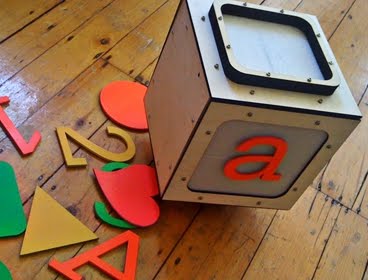
A recent article from MIT News discusses a block-shaped robot that seems to roll onto a computer screen and is part of an educational-media system that gets kids out of their chairs.

"One of the things that make play so important for children's development and learning is that it’s an opportunity to be generative, to be creative, rather than just to receive." - Harvard Senior Lecturer and Director of the Harvard Graduate School of Education's Technology, Innovation, and Education program Joe Blatt (MIT News, 11/22/10)

Thursday, December 2, 2010

ATS Picks 12/02/10

Creative Commons provides free tools that let authors, scientists, artists, and educators easily mark their creativity. Creative Commons can help you find photos, music, text, books, educational material, and more that is free to share or build upon utilizing Creative Commons enabled search services.


The Center for Social Media has created a set of teaching tools for teachers who are interested in teaching their students about fair use. The tools include powerpoints with lecture notes, guidelines for in-class discussions and exercises, assignments and grading rubrics. We hope you'll find them useful!

In AU Professor Larry Engel's Advanced Documentary Technique class, ten grad students used the "Code of Best Practices in Fair Use for Online Video" to try to create "fair use" mashup videos. Take a look at the videos and decide how well (or not) they did!
(An activity from the Center for Social Media)

4)
Edutopia Digital Youth Portrait: Nafiza, 18 years old

Discussion Questions
1. Is Nafiza typical of kids in your community? Why, or why not?
2. Is it surprising that Nafiza spends so much time playing video games? Why, or why not?
3. Nafiza uses technology "from the moment she wakes up." Is she over-connected?
4. What skills is Nafiza learning by participating in Global Kids? How is Global Kids changing her worldview?
5. Why do you think kids like Nafiza enjoy virtual worlds like Second Life? Do virtual worlds have any learning potential?

Spanish Skits Using iMovie and Green Screen

Ideas for Green Screen Video Production

Last year Ms. Jamison introduced the green screen idea to the Middle School. By shooting your next project on a green screen, you have ability to create a clean and stylish video production. Since you will have the ability to alter the background of your production, there are no limits to the creative direction of your final composition. The basic idea of green screen production is simple: setup a green screen, shoot the presentation in front of it, then remove the green in your video editing software (iMovie) and replace it with your chosen background in post production.

Here are some of the
latest images from Hardy's eighth grade Spanish classroom.


A Lesson to Introduce Students to Creative Commons Licensing Agreement

Seventh graders in Billing's classroom were introduced to Creative Commons Licensing Vocabulary when they were asked to conduct research on an Incan topic using Wikipedia. They were asked to use images and consider their licensing agreements. Each wikipedia image file includes: description, date, source, author, file history, file links and permissions- licencing agreement for use and distribution.

An example of one of the licenses is shown below:

This file is licensed under the Creative Commons Licensed Attribution-Share license

You are free:
to share – to copy, distribute and transmit the work
to remix – to adapt the work

Under the following conditions:
attribution – You must attribute the work in the manner specified by the author or licensor (but not in any way that suggests that they endorse you or your use of the work).

share alike – If you alter, transform, or build upon this work, you may distribute the resulting work only under the same or similar license to this one.

You may elect the license of your choice

Wednesday, December 1, 2010

Eighth Grade Current Event History Blog

Read the latest eight graders posts and comments to the Current Event History Blog. All the leading questions are selected by students .

Hs8-4 Blog Post: Airport Security: Too Much or Too Little
  • Do we need this security, or more?
  • Can we do with less security?
  • Where would YOU draw the line between what is necessary/appropriate?
  • Are you worried about flying?
  • Who should make these security decisions?

Hs8-2 Blog Post: Hazing in Needham
  • Based on your understanding of the Mass Hazing Law, is the suspension of the 5 players on the Needham High School soccer team just punishment for the alleged hazing incident that the younger classwomen were subjected to; why or why not?
  • Do you think the parents were right in their efforts to override the decision the judge made to not allow the girls to play in the tournament game?
  • If all students are clearly made aware of hazing laws by their school, then why do kids continue to commit such mean and degrading acts on other students?
  • How would you react if you were with a group of your school friends and you witnessed another group of students who were “hazing” another student or group of other students? Keep in mind the students committing the hazing act could be several years older than you.

  • Is piracy a significant issue?
  • Should people have the right to copy software?
  • Is Microsoft being too extreme in its prevention methods?